

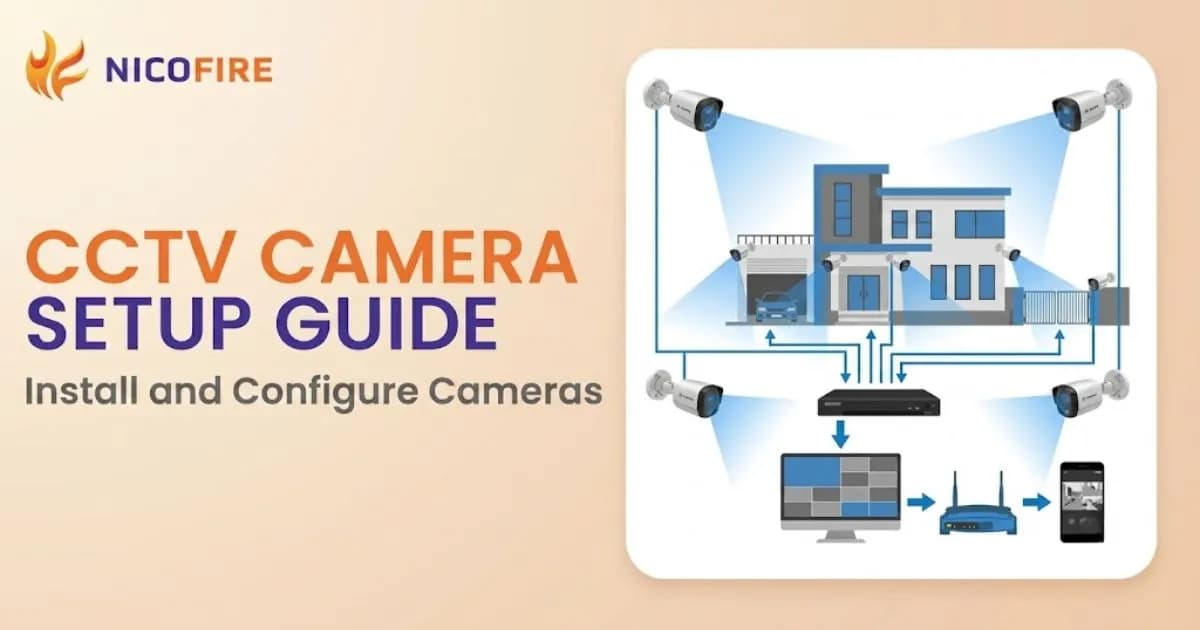
Installing a CCTV system may seem difficult at first, but it becomes easy when you follow the right steps. Many people in Nepal install CCTV cameras themselves to save money and improve the security of their homes or businesses. A proper installation also helps the system work better and record clear video.
In this guide, you will learn how to plan your CCTV setup, install the cameras, connect the system, and test everything
Table of Contents
Understanding Your CCTV Choices
Main Parts of a CCTV System
A CCTV system is made of a few main items that work together to help keep a place safe. The camera is the part that records what is happening. The DVR or NVR is the machine that saves the video so you can watch it later. A hard drive or cloud storage is used to keep the video safe. You also need power supply units to give electricity to the cameras and the recorder. Cables help connect the parts, and a monitor or TV lets you see the video clearly. When you know what each part does, it becomes much easier to choose the right CCTV system and set it up without stress.
Wired CCTV Systems
A wired CCTV system uses cables to connect the camera directly to the recorder. This makes the video very steady and clear because the signal travels through the wire without breaking. This type of system is a good choice for homes, offices, and shops that need strong and reliable security every day. The only extra work is drilling small holes and arranging the cables neatly during installation. Once everything is in place, the system works very smoothly and does not need much fixing. Because it does not depend on Wi Fi, the video does not stop or lag, which makes wired systems very steady and easy to trust.
Wireless CCTV Systems
A wireless CCTV system does not need long cables, so it is much easier to install. These cameras connect to the recorder or your phone through Wi Fi. This makes them a great choice for rented homes, apartments, or places where drilling holes is not allowed. You can also find different types of wireless cameras, like simple Wi Fi cameras, IP cameras, and even solar-powered cameras for outdoor use. They are easy to set up and easy to move around when needed. But wireless cameras depend on your internet connection. If your Wi Fi is strong, the camera shows smooth and clear video, but if the signal is weak, the video can stop or become unclear. Even so, wireless CCTV systems are very convenient and helpful for most families.
Easy Planning for Your CCTV Setup
Find Important Areas
Before installing your CCTV cameras, take a slow walk around your home or office and look carefully at all the places that should be watched. Start with the main door because it is the most common entry point. Then check the back door, ground-floor windows, parking area, staircase, and backyard. Also think about any area where something unsafe or suspicious happened before. For large open areas, you may use a PTZ Camera because it can rotate and zoom. These spots are usually the most important to cover. When you do this simple check, you will understand which angles need to be watched, how many cameras are needed, and which spots must always stay in view. This early planning makes the whole installation much easier and much safer.
Place Cameras Correctly
The way you place your cameras decides how well your CCTV system will work. Cameras should be placed at a good height so people cannot touch or damage them, but still low enough to capture faces and clear details. Try to point the cameras toward big open areas like the gate, driveway, shop entrance, parking area, or long hallways. This helps you see more in one video. Also make sure the camera is not facing bright sunlight or strong lights because this can make the video too bright or unclear. When cameras are planned and placed in the best spots, you get full coverage of your space with very few blind spots. This means better protection and clearer recording every day.
Plan Cable and Power Routes
If you are installing a wired CCTV system, planning where the cables will go is very important. Before drilling any holes, look at the camera location and think about the best path for the cable to reach the DVR or NVR recorder. Check where power outlets are because both the cameras and recorder need a steady power supply to work properly. Try to run cables along walls, corners, ceilings, or inside small pipes so they stay neat and safe from damage. Good cable planning also keeps your home looking clean and prevents people from tripping over loose wires. When cables and power routes are planned correctly, your CCTV system becomes more stable and works smoothly for a long time.
Tools You Need for Easy CCTV Installation
1. Basic Tools
To install your CCTV system properly, you will need a few basic tools that make the job simple and safe. A drill or drilling machine helps you make holes in the wall so the camera bracket can be fixed tightly. Screwdrivers are needed to tighten screws and keep the camera steady. A strong ladder is very important because it helps you reach higher places without falling or losing balance. When you have good-quality tools, the installation becomes smoother, faster, and much safer. These tools also help you mount the cameras in the right position, making sure they do not move or fall later.
2. Cable Tools
For a wired CCTV system, cable tools are very important because they help keep your wires neat and safe. Cable ties are small straps that hold wires together, while cable clips help attach wires to walls so they stay in place. Network cables and BNC cables are used to connect the cameras to the recorder. When you use these tools, your wiring looks clean and organized, and there is less chance of wires getting pulled or damaged. Good cable management not only makes your setup look tidy but also helps your CCTV system work better for a long time.
3. Testing Tools
Before fixing the cameras permanently, it is important to test them using simple testing tools. A cable tester helps you check whether your cables are working properly and carrying signals without problems. A small portable monitor is useful because it lets you see the camera view before you mount it on the wall. This helps you adjust the angle and position easily. Testing everything early saves you a lot of time and prevents you from having to redo the installation later. It makes sure your system works correctly from the very beginning.
4. Safety Gear
Safety gear helps protect you while you install your CCTV system. Gloves keep your hands safe while you handle tools and wires. Safety glasses protect your eyes from dust or small pieces that may fly out when you drill holes. Shoes with good grip help you stand firmly on the ladder without slipping. Using these simple safety items keeps you safe from accidents and makes the installation process much easier and stress-free. With proper safety gear, you can work confidently and finish your CCTV installation safely.
Getting Your CCTV System Ready
1. Check Everything in the Box
Before you begin installing your CCTV system, open the box and check all the items carefully. Look at the installation manual and make sure every part mentioned in the list is there. You should have the cameras, cables, power adapters, mounting brackets, screws, and the DVR or NVR recorder. This simple check helps you avoid problems later because missing parts can delay the whole setup. When everything is counted and ready, you can start your installation with confidence.
2. Test All Parts First
Before fixing the cameras on the wall, it is a good idea to test them on a table. Connect the camera to the power supply and to the monitor or DVR/NVR for a quick check. Make sure the camera turns on and shows a video. Also check if the DVR or NVR starts properly and responds to the buttons or remote. Testing everything early helps you find any faulty part before installation, which saves time and effort. If something does not work, you can replace it right away instead of removing mounted cameras later.
3. Update Your System
Before installing the cameras permanently, check if your DVR, NVR, or camera has any new updates available. These updates are called firmware updates, and they are made by the company to fix problems, add new features, and make the system more secure. Updating your system at the beginning helps it run smoothly and safely. It also makes your cameras work better with mobile apps and remote viewing. Doing this step early helps you avoid setup issues later and gives your CCTV system the best performance from the start.
Installing a Wired CCTV System
1. Mount the Cameras
Start by fixing your wired cameras to the wall or ceiling using the mounting bracket that comes in the box. Use a drill to make small holes and gently tighten the screws so the camera stays firm. Before locking the screws completely, check the angle of the camera to make sure it is pointing in the right direction. When the camera is fixed properly, it will stay steady even during strong wind or heavy rain. A strong mounting job also helps you get a clear and stable video every day.
2. Run the Cables Safely
Wired CCTV systems need cables to carry the video from the camera to the recorder. You may use Ethernet cables, RG59 cables, or Siamese cables depending on your system. Carefully run the cables along walls, corners, or ceilings so they stay protected. Use cable clips or conduits to keep the wires neat and safe from damage. Good cable management helps prevent accidents, reduces the risk of wires breaking, and keeps your home or office looking clean. When cables are handled properly, your CCTV system works smoothly for a long time.
3. Connect to the Recorder
Once the cables reach the DVR or NVR, connect them correctly. DVR systems use BNC connectors, while NVR systems use Ethernet cables. If your system uses Power over Ethernet, a PoE switch will give both power and video through one single cable, which makes installation easier. After connecting everything, check that each camera appears on the recorder screen. This step makes sure your cameras are connected properly and ready for final setup.
4. Give Power to the System
To make your wired CCTV system run, you need to connect the cameras and the DVR or NVR to a stable power supply. Make sure the power adapters are plugged in securely. In many places in Nepal, power cuts can happen often, so using a UPS is a smart choice. A UPS keeps your CCTV running even when the electricity goes off, which helps you record important moments without interruption. A strong and steady power connection keeps your CCTV system safe and reliable at all times.
Installing a Wireless CCTV System
Mount the Cameras
Start by choosing a place where your wireless camera can receive a strong Wi Fi signal. Good signal strength is important because it helps the camera send clear video to your phone or recorder. Before fixing the camera, check the signal by standing in that spot with your phone and testing the Wi Fi. If the signal is strong, use the mounting bracket that comes with the camera to fix it on the wall or ceiling. Make sure the camera is pointing in the right direction before tightening the screws. When the camera is mounted properly, it will stay steady and record clear video.
Give Power to the Cameras
Wireless cameras still need power to work, even though they do not use long cables for video. Some wireless cameras run on rechargeable batteries, some use a simple power adapter, and some have a solar panel that charges the camera using sunlight. Make sure the power source is stable so the camera does not turn off suddenly. Solar powered wireless cameras are very useful for outdoor areas where it is hard to run cables. They keep working even when there is no electricity, which makes them a great choice for gardens, gates, and remote areas.
Connect to Wi Fi
After mounting and powering the camera, you need to connect it to your Wi Fi network. Open the camera’s mobile app or setup page and follow the simple steps to link it to your home router. Once connected, you will be able to see the live video on your phone or computer. If the video looks weak or keeps stopping, your Wi Fi signal may not be strong enough. In that case, you can install a Wi Fi repeater to boost the signal. A stronger Wi Fi connection helps the camera work better and gives you smooth and clear video without breaks.
Setting Up Your CCTV System for the First Time
Open the DVR or NVR Menu
To begin the setup, connect your DVR or NVR to a monitor or TV using an HDMI cable. Once you turn it on, you will see the main menu on the screen. This menu shows simple steps that guide you through the first-time setup. You may be asked to choose a language, set the date and time, and create a password for your system. Take your time and follow each instruction slowly. Most CCTV systems are made for beginners, so the steps are easy to understand. By completing this process, your DVR or NVR becomes ready to receive video from your cameras.
Set Up the Network
If you are using IP cameras or want remote viewing on your phone, you must set up the network. This means connecting your DVR or NVR to your internet router using an Ethernet cable. After that, you may need to enter simple network details that the system will guide you through. Once the network is set, your cameras should appear on the screen automatically. A correct network setup also allows you to watch your video from anywhere using the CCTV mobile app. This is very helpful for people who travel often or want to check their home or shop while they are away. A strong network connection ensures your video loads smoothly without freezing or delays.
Adjust Camera Settings
Once all cameras appear on the screen, you can improve the video by adjusting basic settings. You can change the resolution to make the video clearer, increase or decrease brightness based on your lighting, or adjust sharpness so details look better. If your camera supports higher megapixels, you can select that for better picture quality. Some users prefer the highest settings for strong security, while others keep it lower to save more storage space. Try different settings until the video looks clear and comfortable to watch. Good camera settings help you capture clear faces, number plates, and important details whenever needed.
Advanced Settings to Make Your CCTV System Stronger
1. Set Recording Options
Your CCTV system allows you to choose how and where your videos will be saved. You can store your footage on a hard drive inside the DVR or NVR, on an SD card if your camera supports it, or on cloud storage if online saving is available. After choosing storage, select how your cameras should record. You can record all the time, only during certain hours, or only when the camera sees movement. These simple settings help you save storage space and make sure important moments are always recorded. When your recording settings are planned well, your CCTV system becomes easy to manage and more reliable.
2. Use Motion Detection and Alerts
Motion detection is a very helpful feature because it tells your camera to start recording when something moves in front of it. You can set which areas on the screen should be watched for movement, like your gate, front door, or parking space. You can also turn on mobile alerts so your phone receives a message when the camera detects motion. This helps you know what is happening in real time even when you are not at home. Motion detection saves storage and gives you instant updates whenever something unusual happens.
3. Turn On Remote Access
Remote access allows you to watch your camera feed from your phone or computer anywhere in the world. To set this up, open the camera app or login page and follow the steps to connect your DVR or NVR to your account. Once it is set, you can check your home, office, or shop anytime with just a tap on your phone. Make sure your password is strong so no one else can view your cameras. Secure remote access gives you peace of mind because you always know what is happening around your property.
4. Improve Image Quality
Your CCTV system has advanced settings that help make the video clearer in different lighting conditions. You can adjust night vision to see better in the dark, change infrared strength, or fine-tune exposure so bright or dark areas look balanced. Some systems also offer WDR, which helps the camera handle strong light and shadows at the same time. When you adjust these settings correctly, your cameras produce clearer and sharper videos, helping you capture important details at any time of day or night.
5. Connect to Smart Home Devices
Many modern CCTV systems can work with smart home devices. If your system supports this, you can connect your cameras to alarms, smart displays, or other smart gadgets. This makes your security setup more convenient because you can control everything from one device. For example, your camera can show video on a smart screen or trigger an alarm when it detects movement. Smart home integration makes your CCTV system more useful and helps improve your overall home security.
Testing Your CCTV System Properly
Check All Camera Views
After the installation is complete, start by checking every live camera view on your monitor or phone. Spend a little time watching each camera to make sure the video is clear, bright, and stable. If the picture looks blurry, clean the lens gently and adjust the focus if needed. Make sure the camera is not shaking or tilting and is pointing in the right direction. Check if each camera covers the area you planned, such as the gate, parking area, or hallway. If anything is missing from the frame, move the camera slightly to cover more space. This step helps you fix small problems early, so your CCTV system gives you full and strong coverage.
Test Recording and Playback
Recording is one of the most important parts of your CCTV system, so take time to test it properly. Let the system record for a few minutes or hours, depending on what you want to check. Then open the playback section and watch the saved video. Make sure it plays smoothly without freezing or skipping. Also check older recordings to see if they were saved correctly and if your hard drive or memory card is working properly. If the video does not save or the playback does not work, fix the issue before moving forward. Testing this early makes sure your CCTV system will record important events when needed.
Check Motion Detection and Alerts
Motion detection helps you save storage and stay aware of any activity around your home or office. To test this, walk in front of your cameras and see if they detect movement. Your phone should receive an alert almost immediately. If you get too many alerts even when nothing important is happening, reduce the sensitivity. If you do not get alerts when someone moves, increase the sensitivity. You can also adjust the motion detection area, so the camera focuses only on important spots like your gate or entrance. A well-adjusted motion system helps you stay informed without unnecessary notifications.
Test Remote Viewing
Remote access is very helpful because it allows you to check your cameras from anywhere. To test this, try opening your camera feed on multiple devices, such as your phone, laptop, or a computer using web browsers like Chrome or Internet Explorer. Make sure the video loads quickly and clearly on each device. If the video takes too long to load, check your internet connection or Wi Fi signal. Testing remote viewing from different devices ensures you can watch your home or shop anytime you need, even when you are far away.
Adjust Camera Angles
After testing everything, look again at each camera’s angle and make final adjustments. Try to remove any blind spots by slightly moving the camera left, right, up, or down. Make sure the camera is capturing the correct height so faces, number plates, and important objects are clear. Check if the camera covers wide areas properly, such as your yard, gate, or office room. When the angles are well set, your CCTV system becomes much more effective and gives you complete protection with clear visibility of all important areas.
Maintenance & Long-Term Security of Your CCTV System
1. Keep Your System Updated
Just like a phone or computer, your CCTV system also needs regular updates to work better and stay safe. These updates are called firmware updates. They fix old problems, add new features, and protect your system from online threats. When you update your system regularly, your cameras run more smoothly, and your security stays strong. It is a simple step, but it helps keep your CCTV safe from hacking and other risks. Check for updates every few months and install them as soon as they are available.
2. Take Care of the Cameras
Your cameras stay outside or in busy areas, so they can get dirty or dusty. To keep your video clear, clean the camera lenses gently with a soft cloth. Also check the cables from time to time to make sure they are not damaged or loose. If you have outdoor cameras, make sure the weatherproof seal is still strong, especially during the monsoon when rain and moisture can enter. Taking a few minutes to check your cameras regularly helps them last longer and work better in all weather conditions.
3. Manage Your Storage
Your CCTV system saves video every day, so it is important to take care of your storage. Delete old or unimportant footage to make space for new recordings. Save important clips separately on a hard drive, USB, or cloud storage so you do not lose them. It is also a good idea to check the health of your hard drive once in a while to make sure it is not getting slow or damaged. Good storage habits help your CCTV system run smoothly for many years without problems.
Conclusion
Installing a CCTV system becomes easier when you understand each step clearly. When you choose the right cameras, plan where to place them, test the system carefully, and take good care of it, you create a strong security setup for your home or business. A good CCTV system is not only a group of cameras. It is a helpful safety tool that allows you to watch your property at any time. When the cameras are placed well and the settings are correct, you get clear video, wide coverage, and better protection. This helps you stay aware of what is happening around your home or shop and keeps your loved ones safe.
Taking care of your CCTV system is very important. Simple actions like cleaning the camera lenses, checking the wires, updating the system software, and managing your storage help your CCTV work smoothly for a long time. These small steps improve video quality and make your security stronger. As you learn more about CCTV systems, you can choose better cameras, add useful features, and make your setup even safer. With the right care and knowledge, your CCTV system becomes a long-lasting safety partner that protects your place and gives you peace of mind every day.
Frequently Asked Questions
The best CCTV system depends on your needs. Wired systems are reliable with stable video quality, while wireless/IP cameras are easier to install and can be accessed remotely. For offices or large buildings, IP cameras with NVR and motion detection are recommended.
Yes, many people in Nepal install CCTV systems on their own. By following proper steps, such as planning camera locations, running cables, connecting to DVR/NVR, and testing the system, you can set up a secure system without a technician.
Choose cameras based on location, lighting, and purpose. For outdoor areas, pick weatherproof cameras with night vision. For indoor use, standard cameras with adjustable angles work well. High-resolution cameras help capture faces and number plates clearly.
To view your CCTV remotely, connect your cameras or DVR/NVR to the internet and use the mobile app provided by the manufacturer. A stable Wi Fi or internet connection is necessary for smooth live streaming and alerts.
Regular maintenance includes cleaning lenses, checking cables, updating firmware, testing motion alerts, and managing storage. Proper care ensures clear video, smooth recording, and prevents system failures over time.
Wired CCTV systems use cables for video transmission, providing stable and reliable footage, while wireless systems use Wi Fi or IP connections, which are easier to install but depend on internet strength. Wired systems are ideal for permanent setups, wireless is good for flexibility.
Comments
No comments yet.
Be the first to share your thoughts.